macOS 14–27 · Beta · CSHO.de

Deine Menüleiste.
Aufgeräumt.

Your menu bar.
Tidied.

Tidier versteckt, ordnet und zeigt deine Menüleisten-Symbole — frei, quelloffen und in 26 Sprachen. Nativ in Swift für macOS.

Tidier hides, arranges and shows your menu bar icons — free, open source and in 26 languages. Native Swift for macOS.

Vorher — volle MenüleisteBefore — full menu bar macOS-Menüleiste mit vielen Symbolen (WLAN, Bluetooth, Spotlight …)
Mit Tidier — ein KlickWith Tidier — one click Aufgeräumte macOS-Menüleiste, nur noch wenige Symbole
Ein Klick blendet die Symbole aus — auch WLAN, Bluetooth oder Spotlight. Echte Screenshots, macOS 27.
One click hides the icons — including Wi-Fi, Bluetooth or Spotlight. Real screenshots, macOS 27.
⬇ Für macOS laden ⬇ Download for macOS So funktioniert's How it works
26
Sprachen
Languages
1×
Klick zum Aufräumen
Click to tidy up
0 €
Frei & quelloffen
Free & open source
Swift
Nativ, kein Electron
Native, no Electron
Download

Tidier herunterladen

Download Tidier

v1.1.1 · Universal (Apple Silicon + Intel) · macOS 14–27 · 2,6 MB · GPL-3.0

Tidier ist self-signed und (noch) nicht notarisiert — beim ersten Start blockiert macOS die App. So erlaubst du sie: einmal starten, dann Systemeinstellungen → Datenschutz & Sicherheit → „Trotzdem öffnen". Schritt für Schritt in der Installationsanleitung.

Tidier is self-signed and not (yet) notarized — on first launch macOS blocks it. To allow it: launch once, then System Settings → Privacy & Security → "Open Anyway". Step by step in the install guide.

Einblicke
A look inside

Echte Screenshots

Real screenshots

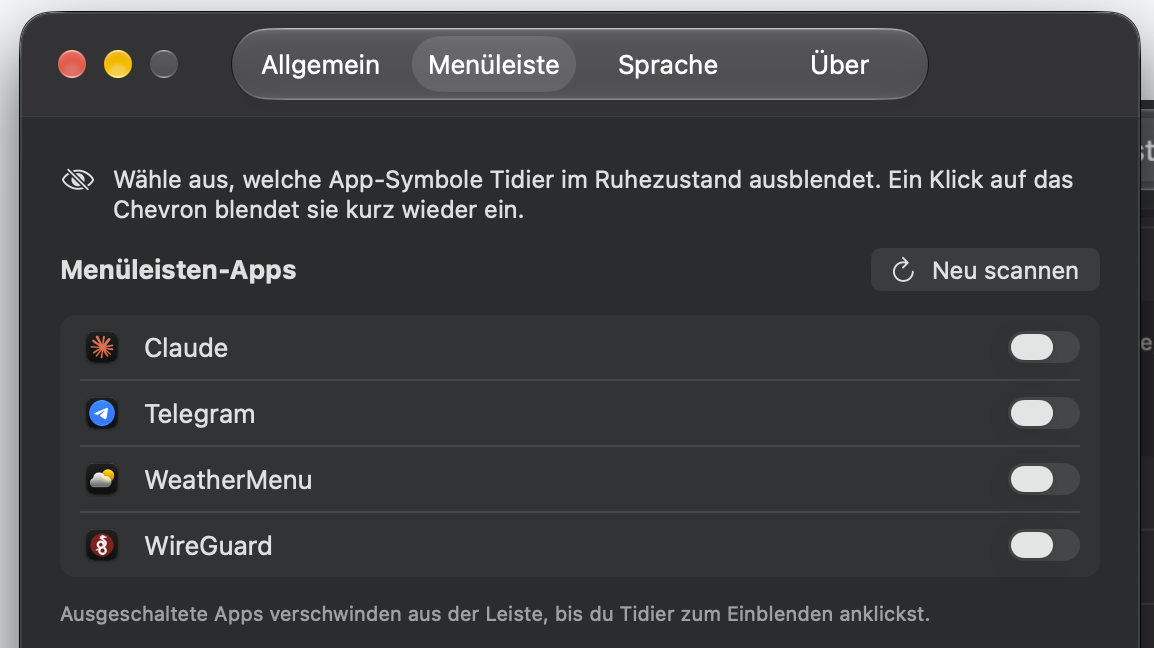
Tidier Einstellungen – Menüleiste, App-Auswahl
Tab „Menüleiste": pro App wählen, welche Symbole Tidier im Ruhezustand ausblendet — hier Claude, Telegram, WeatherMenu, WireGuard.
"Menu bar" tab: choose per app which icons Tidier hides at rest — here Claude, Telegram, WeatherMenu, WireGuard.
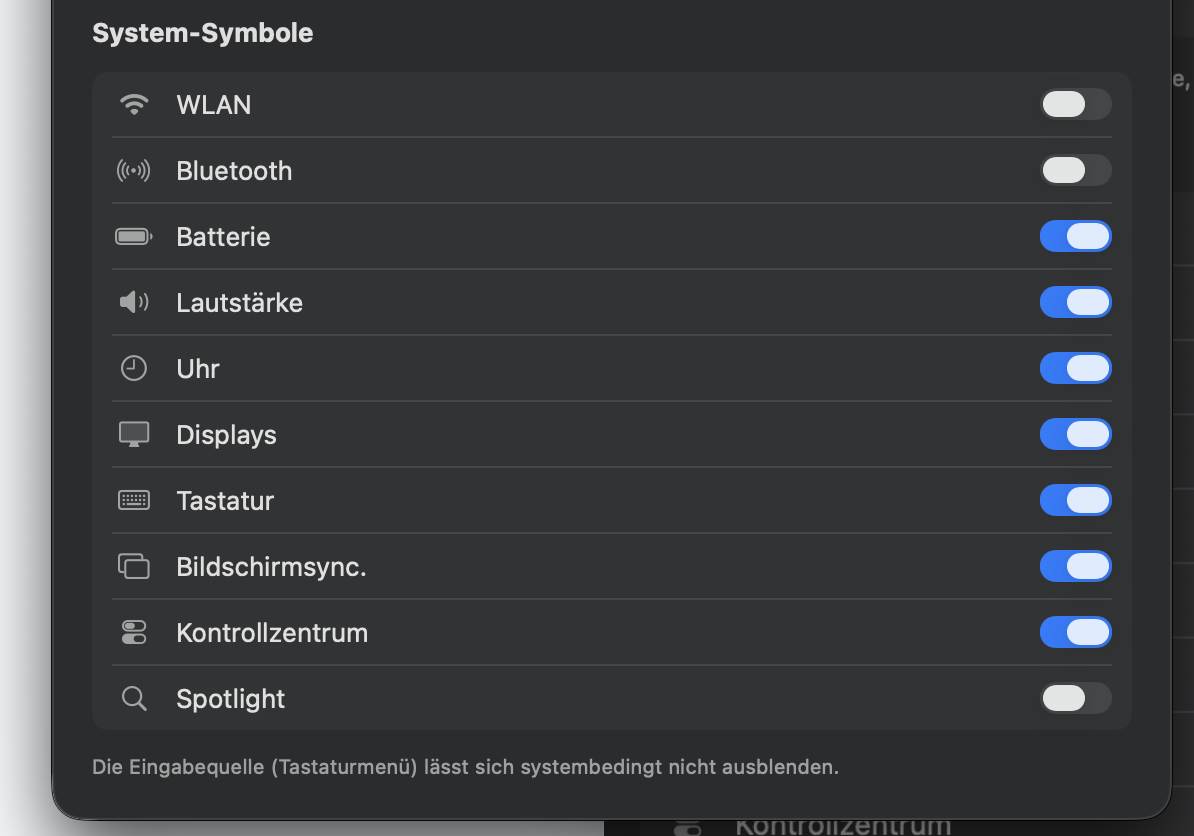
Tidier Einstellungen – Menüleiste, System-Symbole
Auch System-Symbole einzeln: WLAN, Bluetooth, Batterie, Uhr, Spotlight … (das Tastaturmenü lässt sich systembedingt nicht ausblenden).
System items too, individually: Wi-Fi, Bluetooth, battery, clock, Spotlight … (the input menu can't be hidden for system reasons).
So funktioniert's
How it works

Aufgeräumt in drei Schritten

Tidied in three steps

1

Installieren & erlauben

Install & allow

Tidier startet als Menüleisten-Agent (kein Dock-Icon). Einmalig die Bedienungshilfen erlauben — fertig.

Tidier runs as a menu-bar agent (no dock icon). Grant Accessibility once — done.

2

Auswählen, was bleibt

Choose what stays

In den Einstellungen festlegen, welche Symbole immer sichtbar bleiben sollen. Um den Rest kümmert sich Tidier.

In settings, pick which icons should always stay visible. Tidier takes care of the rest.

3

Ein Klick blendet aus

One click hides

Klick auf das Tidier-Symbol versteckt die Symbole — auch System-Items wie WLAN, Bluetooth, Batterie oder Uhr. Noch ein Klick holt sie zurück; optional automatisch nach Intervall.

Click the Tidier icon to hide the icons — including system items like Wi-Fi, Bluetooth, battery or clock. Click again to bring them back; optionally automatic after an interval.

Features
Features

Klein, nativ und richtig übersetzt

Small, native and properly translated

🌍

26 Sprachen

26 languages

Echte Handübersetzung inkl. CJK und RTL — direkt in der App umschaltbar, ohne die Systemsprache zu ändern.

True human translation incl. CJK and RTL — switchable right in the app, without changing your system language.

🪄

Läuft auf macOS 27

Works on macOS 27

macOS 27 hat die alten Tricks zum Ausblenden geschlossen — Ice & Co. können nicht mehr. Tidiers neu gebaute Engine versteckt trotzdem weiter, so wie es auch Bartender macht.

macOS 27 closed the old tricks for hiding menu bar items — Ice & co. can't anymore. Tidier's rebuilt engine still hides, the way Bartender does.

👁️

Verstecken & Zeigen

Hide & show

Ein Klick blendet aus — Drittanbieter genauso wie System-Items (WLAN, Bluetooth, Batterie, Uhr, Spotlight). Dazu Auto-Rehide mit Intervall, Reveal-on-Hover und eine optionale „immer ausgeblendet"-Sektion.

One click hides — third-party as well as system items (Wi-Fi, Bluetooth, battery, clock, Spotlight). Plus auto-rehide with interval, reveal-on-hover and an optional "always hidden" section.

🔒

Minimale Rechte

Minimal permissions

Nur die Bedienungshilfen werden benötigt (Screen-Recording optional). Keine Cloud, kein Tracking — alles bleibt lokal.

Only Accessibility is required (screen recording optional). No cloud, no tracking — everything stays local.

⚡

Nativ, kein Electron

Native, no Electron

Swift 6 mit AppKit und SwiftUI. Läuft als schlanker Menüleisten-Agent ohne Dock-Icon — leicht und schnell.

Swift 6 with AppKit and SwiftUI. Runs as a lean menu-bar agent without a dock icon — light and fast.

🆓

Frei & quelloffen

Free & open source

Kostenlos gedacht als offene Alternative zu Bartender (kostenpflichtig) und Ice — mit dem Fokus auf saubere Übersetzung.

Intended to be free as an open alternative to Bartender (paid) and Ice — with a focus on clean localization.


Status
Status

v1.1 (Beta) — läuft und wächst weiter

v1.1 (beta) — working and still growing

Der Kern läuft und ist live getestet — auch auf macOS 27, nachdem Apple die alten Ausblend-Wege geschlossen hatte und die Engine neu gebaut wurde. An Komfort- und Power-Features wird weiter gearbeitet. Ehrlicher Stand:

The core works and is live-tested — including on macOS 27, after Apple closed the old ways to hide and the engine was rebuilt. Convenience and power features are still in progress. An honest snapshot:

✅ Schon fertig

✅ Already done

  • Verstecken/Zeigen der Menüleisten-Icons — live verifiziert (macOS 14–27)
  • Hiding/showing menu bar icons — live verified (macOS 14–27)
  • Neue Hide-Engine für macOS 27 — versteckt auch System-Items (WLAN/Bluetooth/Batterie/Uhr/Spotlight)
  • New hide engine for macOS 27 — also hides system items (Wi-Fi/Bluetooth/battery/clock/Spotlight)
  • 26 Sprachen, live umschaltbar (LTR, CJK, RTL)
  • 26 languages, live switchable (LTR, CJK, RTL)
  • Auto-Rehide, Reveal-on-Hover, Kontextmenü
  • Auto-rehide, reveal-on-hover, context menu
  • Universal-Build (Apple Silicon + Intel) + DMG, Launch-at-Login, Einstellungen mit 4 Tabs
  • Universal build (Apple Silicon + Intel) + DMG, launch-at-login, settings with 4 tabs

⏳ Noch geplant

⏳ Still planned

  • Items in der Menüleiste selbst umsortieren
  • Rearranging items in the menu bar yourself
  • Menüleisten-Styling (Tint, Rand, Pills)
  • Menu bar styling (tint, border, pills)
  • Trigger (WLAN/Akku/VPN/Script)
  • Triggers (Wi-Fi/battery/VPN/script)
  • Suche in Menüleisten-Items, globale Hotkeys
  • Search across menu bar items, global hotkeys
  • Notarisierung & automatische Updates
  • Notarization & automatic updates
Kompatibilität
Compatibility

Systemvoraussetzungen

System requirements

✓ macOS 14 – 27
✓ Apple Silicon
✓ Intel
✓ nur BedienungshilfenAccessibility only
Unterstützen
Support

Tidier ist frei & kostenlos

Tidier is free

Tidier ist frei, werbefrei und ohne Tracking. Wenn es dir hilft, freue ich mich über einen kleinen Kaffee per PayPal oder eine Kleinigkeit von der Wunschliste — ganz freiwillig.

Tidier is free, ad-free and has no tracking. If it helps you, I'd be happy about a small coffee via PayPal or something off the wishlist — entirely optional.

Feedback
Feedback

Interesse oder Feedback?

Interested or have feedback?

Tidier ist eine Eigenentwicklung von Christian Schniering / CSHO.de und derzeit eine frühe Version (Beta). Du hast Ideen, Wünsche oder möchtest sie testen? Schreib mir gern — Feedback fließt direkt in die nächsten Versionen ein.

Tidier is a personal project by Christian Schniering / CSHO.de and currently an early version (beta). Got ideas, requests, or want to try it? Drop me a line — feedback goes straight into the next versions.

🌐 csho.de
📍 Belfortstraße 4, 45138 Essen
✅ Vielen Dank! Ich melde mich in Kürze bei dir. ✅ Thank you! I'll get back to you shortly.